Test automation
Pixels, not elements: automating Flutter CanvasKit websites
 Ayush
Automation Lead, Span Technoverse3 min read
The Website That Wouldn’t Let Us Inspect It and Can NOT Automate It For Regression Test
Introduction
How one hidden button turned an “impossible” Flutter site into a fully automatable one.
It started like any other automation kickoff. A new client, a fresh website, and a clear goal: automate the core user flows. We opened the site, right-clicked the login button, chose Inspect, and waited for DevTools to point us to our first locator.
Instead, the entire page lit up in blue.
We tried the email field. Whole page. The “Forgot password?” link. Whole page. No <button>, no <input>, nothing to hold on to. For a QA team, a website with no locators is a website you cannot automate.
🔍 The Mystery Behind the Blue Screen
A little digging gave us the answer. The site was built with Flutter Web, using its CanvasKit renderer.
Most websites are built from HTML elements that browsers and testing tools can read one by one. CanvasKit plays by different rules. It paints the entire interface as pixels onto a single canvas, the way a game or a drawing app would. To the browser, that login form wasn’t a form at all. It was a picture of a form.
That explained everything. The inspector could only ever select one thing, the canvas, and tools like Selenium, WebdriverIO and Playwright were just as blind as we were.
🔑 The Hidden Key
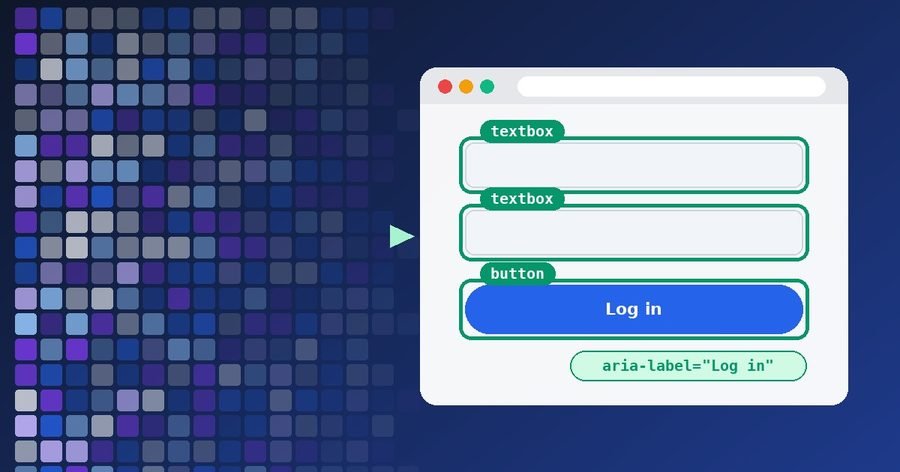
Here’s the twist. Flutter quietly keeps a second map of every screen, called the semantics tree. It describes each button, text field and link so that screen readers can understand the app. To save performance, Flutter keeps it switched off until someone asks for it.
And Flutter leaves a way to ask. Every page carries an invisible “Enable accessibility” button. We opened the browser’s Console tab and pressed it with a single line:
document.querySelector('flt-semantics-placeholder').click();The page came alive. Flutter laid an invisible layer of elements over the canvas, one for every widget on the screen, each carrying a role and an aria-label. Text fields turned into real inputs. We right-clicked the login button again, and this time DevTools showed us exactly the login button.
⚙️ From Console Trick to Test Suite
A console trick is nice. An automated one is better. We added the same line to our tests using the framework’s execute-script feature:
- WebdriverIO: browser.execute
- Selenium: JavascriptExecutor
- Playwright: a simple dispatchEvent
Once it ran, locators like “the button labelled Log in” worked just like they would on any ordinary website.
💡 Lessons We Learned Along the Way
- The tree forgets. Semantics reset on every page load or refresh, so we wrapped the line in a reusable helper and call it after each navigation, always waiting for the hidden button to appear first.
- Labels are only as good as the code. If developers skip semantic labels, the elements show up without useful names. We raised it with the dev team, and the fix helped both our automation and real users who rely on screen readers.
- Test builds can skip the trick entirely. Developers can switch semantics on permanently by adding
SemanticsBinding.instance.ensureSemantics()to the app’s main function. - Stable beats clever. Locators built on role and aria-label hold up far better than index-based XPath, which can break the moment a layout shifts.
📜 The Takeaway
A Flutter CanvasKit website isn’t impossible to automate. It just draws pixels instead of elements. Switch on its accessibility layer, and you get a complete map of the screen to test against.
What looked like a dead end on day one became one of our favourite reminders in QA: when the obvious path is blocked, look for the one built for accessibility.
Case study
Automating a Flutter web app that showed no locators at all
3 automation frameworks unlocked with one technique.