
Web application
Automating a Flutter web app that showed no locators at all
A new client's Flutter web app painted its whole interface onto a single canvas. Inspectors, Selenium, WebdriverIO and Playwright could see nothing to click.
The challenge
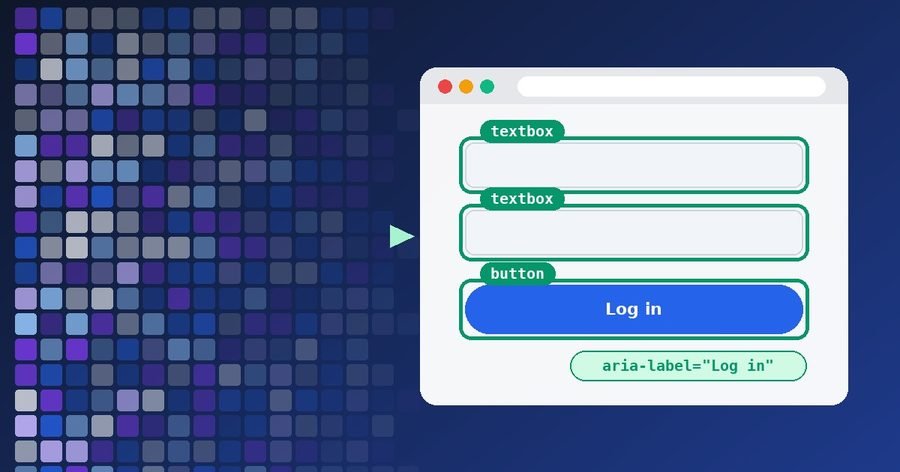
Right-clicking any button highlighted the entire page. The app used Flutter's CanvasKit renderer, which draws the interface as pixels, so to the browser the login form was a picture of a form.
Without locators, the client's core flows could not be put under regression automation.
What we did
Find the hidden map
Flutter keeps a semantics tree for screen readers, switched off by default for performance. Every page carries an invisible Enable accessibility button that turns it on.
Turn the trick into a helper
We trigger that button from the test framework's script execution and wait for it to appear after every navigation, because the tree resets on each page load.
Stable locators
Tests target role and aria-label rather than index-based XPath, so they survive layout changes.
Fix it at the source
Where developers had skipped semantic labels, we raised it with the dev team. The fix improved automation and the experience for screen-reader users.
The result
The client's core user flows are now automated in the framework of their choice, and test builds can switch semantics on permanently with a one-line change to the app's entry point.
When the obvious path is blocked, look for the one built for accessibility.
Tell us what you're shipping next.
Start with a free consultation. We'll look at your current QA process, point out the biggest release risks, and suggest how we'd cover them.